Turn listener feedback into conversation.

ListenerLoop puts a voicemail box on your podcast's website. Listeners record right in the browser, you hear them in your dashboard, and you can write back.

Open source. Run it on your own server, or let us host it for you.

fieldnotespodcast.com/episodes/42

Field Notes

Episode 42: The Quiet Hours

Three people who work while the rest of us sleep, and what they notice about the city at 4 a.m.

Got a story or a question for the next episode?

That card is the real widget. Press the button and leave us a message (up to 60 seconds).

From your website to your inbox in three steps

No app for your listeners to install, no account for them to make. You add one line of code and you are done.

  1. Add one line to your site

    Paste it into any page where you can add a bit of HTML: WordPress, Squarespace, Wix, or a site you built yourself. The widget appears right where you put it.

    <script src="https://your-listenerloop/embed.js"
            data-site-key="pk_your_key" async></script>
  2. Listeners record in their browser

    They tap the button, say their piece and send it. It works on phones and computers. If the microphone is blocked, they can upload an audio file instead. They give a name so you know who is talking, and an email only if they want a reply.

  3. You listen, reply and keep the audio

    Every message lands in your dashboard with a waveform, speed control and an optional transcript. Write back by email, star the good ones, download the MP3 and drop it into your next episode.

A dashboard built for people who make shows

Everything a host needs to go through listener mail, without a pile of spreadsheets and audio files.

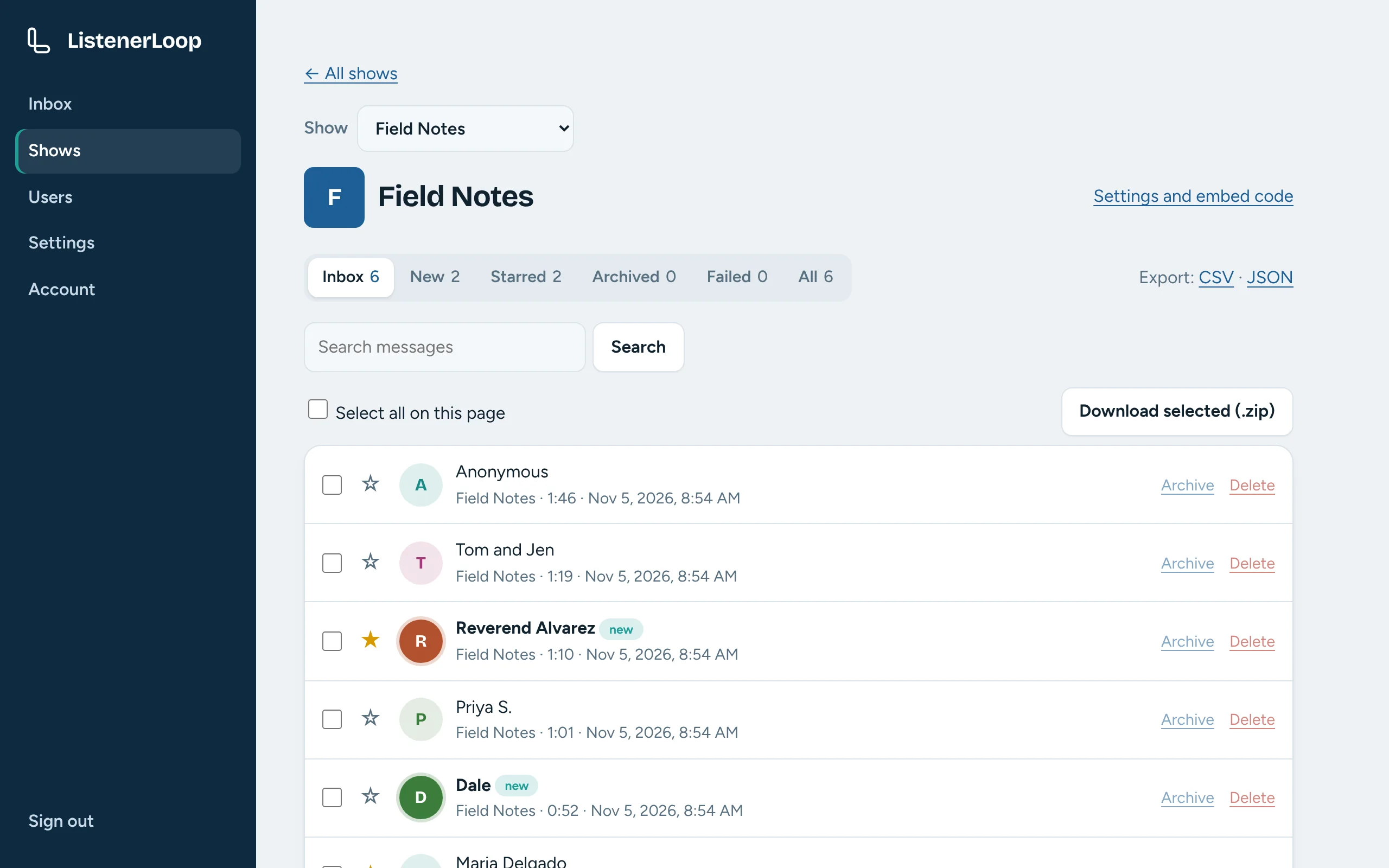
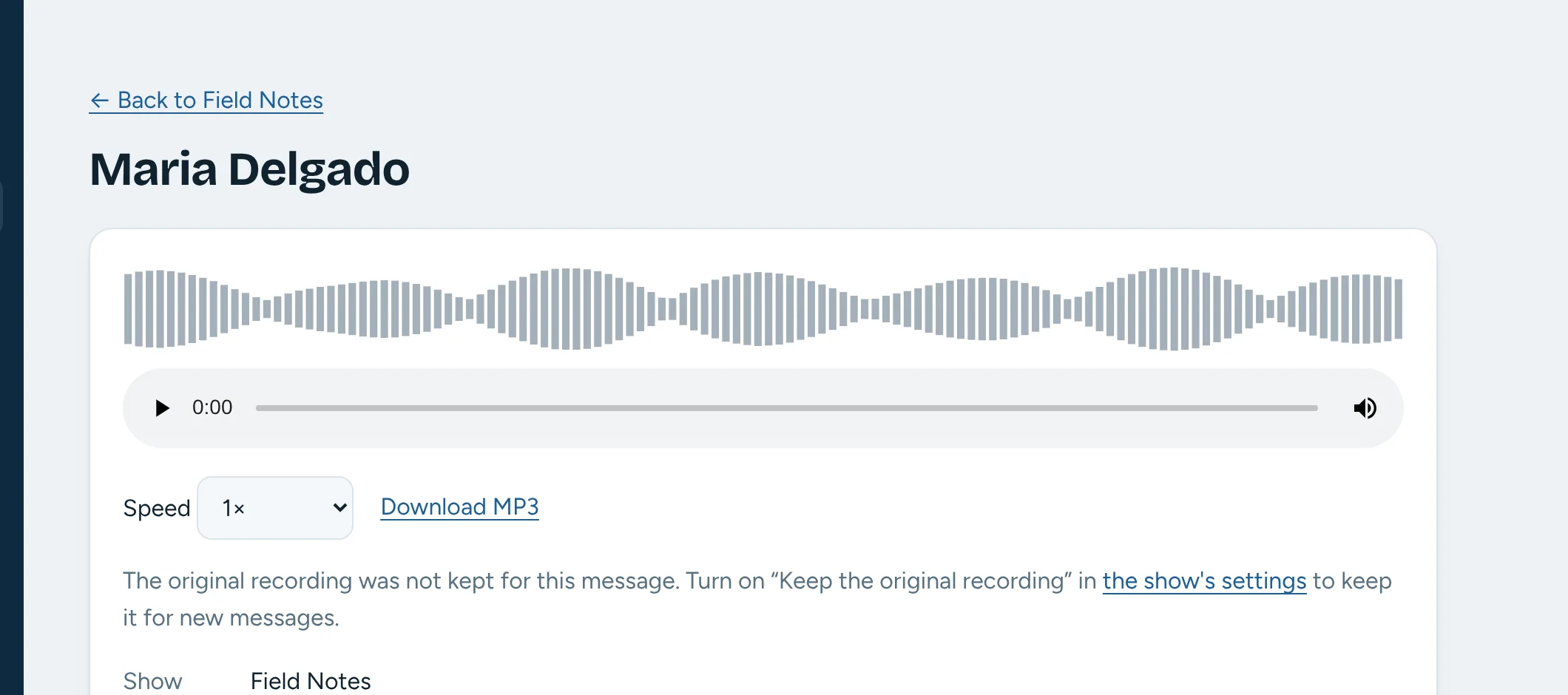
The ListenerLoop inbox for a show called Field Notes, listing voicemails with the sender's name, length and time, filter tabs, and a search box. A single voicemail with its waveform, audio player, speed control and download link.
One inbox per show
Run several podcasts from one place. Each gets its own inbox, its own embed and its cover art from your RSS feed.
Listen properly
Click the waveform to jump around, change the speed, and switch between the cleaned-up audio and the original recording.
Find anything
Search by name, email, your private notes and, with transcription on, the words people actually said.
Reply by email
When a listener leaves an address, answer from the message page. Their reply goes straight to your show's inbox.
Clean, even audio
Every recording is converted to MP3, with optional noise reduction and volume levelling so quiet callers are as easy to hear as loud ones.
Spam stays out
Cloudflare Turnstile and rate limits keep bots away without making listeners solve puzzles.
Your team
Invite co-hosts and producers with the access they need, from read-only to running their own shows. Two-step sign-in is built in.
Works with your tools
Signed webhooks, CSV and JSON export, zip download and scheduled backups, so messages can flow wherever your workflow lives.

Run it your way

ListenerLoop is open source. Host it yourself and keep everything, or let us run it for you.

Host it yourself

For people comfortable with a small server. You own the software, the recordings and the bill.

  • Your recordings stay yours. They live in your own storage (Cloudflare R2, any S3 service, or local disk) and nowhere else.
  • No per-message fees. No caps, no tiers, no "upgrade to hear more messages."
  • Nothing to be locked into. It is licensed AGPL-3.0, so you can read every line and take it with you.
  • Runs on a small machine. A modest virtual server with Docker is plenty; an installer script does the setup.
git clone https://github.com/rgblack316/ListenerLoop.git
cd ListenerLoop && sudo ./scripts/install.sh
See it on GitHub

We host it for you

No server, no command line. We run ListenerLoop, and you just paste the line of code into your site.

  • Setup, updates, storage and backups handled for you
  • The same dashboard and features as the self-hosted version
  • Currently in private beta

Pricing to be determined.

Apply for the beta

Be first in line

Join the waitlist and we will tell you when the hosted service opens. Running a podcast and want to help shape it? Apply for the beta.

Join the waitlist

Apply for the beta

Questions

How much does it cost?

Pricing to be determined for the hosted service. The software itself is free and open source, so hosting it yourself costs only your own server and storage. Join the waitlist and you will hear when pricing is set.

Do my listeners need an account or an app?

No. They press the button, allow the microphone, record, and send. They type a name so you know who it is from. An email address is optional and only needed if they want a reply.

Which phones and browsers work?

Current Chrome, Safari, Firefox and Edge on phones and computers, including iPhone. If a browser blocks the microphone, listeners can upload an audio file instead, and each show also gets a hosted recorder page you can link from newsletters and social bios.

Where do the recordings go?

Every message is converted to MP3 and stored in the storage you choose when you host it yourself. If you keep original recordings, those are stored too and you can compare them with the processed version. When we host it, they live in our storage.

Can I use it on more than one podcast?

Yes. Each show has its own embed code, allowed websites, settings and inbox, and you can give co-hosts access to only the shows they need.

Is it really open source?

Yes, under the GNU AGPL-3.0. You can read, run and change it. If you run a modified version as a service for others, the license asks you to share your changes.

How do you keep spam out?

Cloudflare Turnstile checks each submission without puzzles, and there are limits per person and per show. Listeners must also tick a notice that their message may be played on the show.

What does the beta involve?

You get early access to the hosted service, use it on a real show, and tell us what works and what does not. Apply with the form above and we will be in touch.